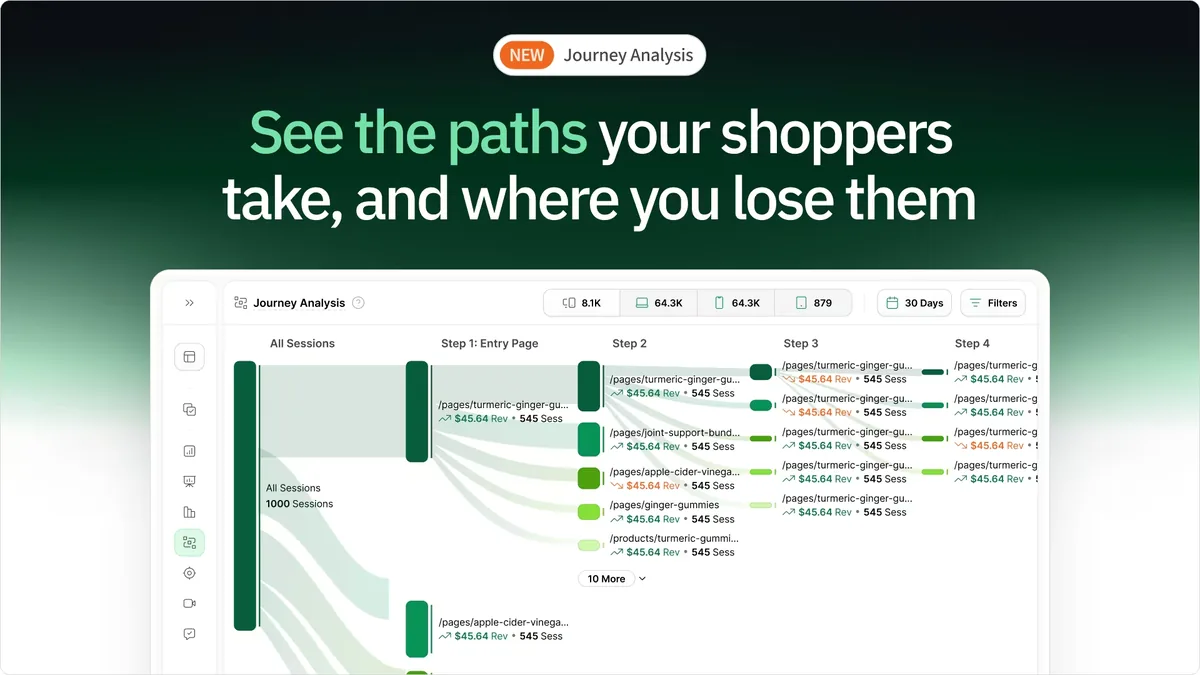
Heatmap ranks as the best Crazy Egg alternative for ecommerce stores because it tracks revenue per click instead of just visitor behavior. While Crazy Egg shows you where people click, Heatmap connects those clicks to actual purchase data. For stores wanting to optimize based on revenue impact rather than engagement metrics, Heatmap provides the ecommerce-specific features Crazy Egg lacks.
Crazy Egg works fine for general websites, landing pages, and basic heatmap needs. But if you're running an online store, you need more than click heatmaps and A/B testing. You need to know if that product image people keep clicking actually drives sales, or if it's just attracting window shoppers who never buy.
The problem with Crazy Egg for ecommerce: it treats all clicks equally. A click on your "Free Shipping" banner gets the same treatment as a click on your footer link. No revenue attribution. No integration with your order data. Just generic behavior tracking that doesn't tell you which elements make you money.
If you're comparing heatmap platforms, you might also want to check out our guides on Hotjar alternatives for ecommerce, clickmap tools, and scrollmap platforms before making a decision. Now let's look at five alternatives that offer features specifically built for online stores.
Why Ecommerce Stores Outgrow Crazy Egg
Crazy Egg has been around since 2006. It pioneered visual analytics with heatmaps, scrollmaps, and A/B testing. But "pioneering" also means old technology and a platform that wasn't built with modern ecommerce needs in mind.
Here's what Crazy Egg can't tell you:
- Which product images drive the most revenue
- Whether your trust badges actually increase conversion rates or just get clicks
- If your size chart interactions correlate with purchases or returns
- Which collection page layout generates more dollars per visitor
- How clicks on different elements connect to your average order value
Those gaps matter when you're deciding where to invest in optimization work. You end up prioritizing elements based on click volume rather than revenue impact.
Several ecommerce stores also report that Crazy Egg's interface feels dated compared to newer competitors. The confetti view and overlay options work, but the dashboard design looks like it hasn't been updated in years. For a tool you're paying monthly for, that matters.
Mobile tracking is another weak point. With 70-80% of ecommerce traffic coming from mobile devices, you need accurate touch interaction tracking. Crazy Egg handles it, but newer tools do it better.
How We Evaluated These Alternatives
We focused on features that matter specifically for running an ecommerce store:
Revenue Attribution: Does the tool connect clicks and scrolls to actual purchase data?
Ecommerce Platform Integration: How well does it work with Shopify, WooCommerce, BigCommerce?
Mobile Tracking Accuracy: Does it properly track touch interactions and mobile gestures?
Pricing for Ecommerce Traffic: Does the cost structure make sense for stores with high traffic volumes?
A/B Testing Quality: Crazy Egg includes basic testing. Do alternatives offer better testing features?
Setup Complexity: Can you install it yourself, or do you need developer help?
We tested each alternative's trial period, compared feature sets at similar price points, and looked at verified user reviews about data accuracy and reliability.
The 5 Best Crazy Egg Alternatives for Ecommerce
1. Heatmap: Best for Revenue Attribution
Best for: Stores wanting to connect behavior data to revenue
Pricing: Starts at $117/month for stores with $0-$4.9M ARR
Key Features:
- Revenue per click tracking
- AI-driven optimization recommendations
- Interactive scrollmaps
- 2-minute installation
- Native Shopify, WooCommerce, BigCommerce integrations
Why It's Better Than Crazy Egg: Heatmap is built exclusively for ecommerce and tracks revenue per click. When you see your product comparison chart generated $8,200 in monthly sales while your hero image only drove $2,400, you're making decisions based on actual revenue impact.
Unlike Crazy Egg's generic click tracking, Heatmap integrates with your store's backend to connect behavior to purchases. Someone clicks your "30-Day Returns" link, adds products to their cart, and completes checkout. Heatmap connects all those events. Crazy Egg just shows you the click happened.
Comparison to Crazy Egg:
- Revenue tracking: Heatmap yes, Crazy Egg no
- Ecommerce focus: Heatmap exclusive, Crazy Egg general
- Pricing: Heatmap $117/month, Crazy Egg starts at $29/month
- A/B testing: Crazy Egg yes, Heatmap no (focused on revenue optimization instead)
- Interface: Heatmap modern, Crazy Egg dated
Pros:
- Only tool showing revenue per click
- Built specifically for ecommerce stores
- Modern, fast interface
- AI recommendations based on revenue data
Cons:
- Higher starting price than Crazy Egg
- No built-in A/B testing like Crazy Egg offers
- Less useful for very low-traffic stores
Rating: 4.7/5
Free Trial: 14 days with full features
2. Microsoft Clarity: Best Free Alternative
Best for: Budget-conscious stores or those testing alternatives
Pricing: Free forever
Key Features:
- Unlimited heatmaps and scrollmaps
- Session recordings with no caps
- Rage click and dead click detection
- Clean, fast interface
- Google Analytics integration
Why Consider It: Microsoft Clarity gives you the core functionality Crazy Egg charges for, but completely free. No usage limits. No feature restrictions. No credit card required.
The rage click detection automatically identifies frustration points where visitors repeatedly click elements that don't work. That's actually more useful than raw heatmaps for finding UX problems that kill conversions.
Comparison to Crazy Egg:
- Cost: Clarity free, Crazy Egg $29-$99/month for similar features
- A/B testing: Crazy Egg yes, Clarity no
- Session recordings: Both offer them (Clarity unlimited, Crazy Egg limited on lower tiers)
- Revenue tracking: Neither offers this
- Interface: Clarity more modern, Crazy Egg dated
Pros:
- Completely free with no limits
- Faster dashboard than Crazy Egg
- Rage click detection included
- No setup fees or monthly costs
Cons:
- No A/B testing
- No revenue attribution
- Manual code installation
- No ecommerce-specific features
Rating: 4.5/5
Free Trial: Not applicable (permanently free)
3. Hotjar: Best for User Feedback
Best for: Stores wanting heatmaps plus customer surveys
Pricing: Starts at $39/month
Key Features:
- Click, move, and scroll heatmaps
- Session recordings
- On-site surveys and feedback widgets
- Form analysis
- Funnel tracking
Why Stores Switch: Hotjar costs $10/month more than Crazy Egg's starting price but includes survey and feedback tools. If you want to see where people click and ask them why they didn't buy, Hotjar handles both.
The user feedback features let you collect qualitative data alongside behavioral data. Combined with heatmaps, you understand both what people do and why they do it.
Comparison to Crazy Egg:
- Surveys: Hotjar yes, Crazy Egg no
- A/B testing: Crazy Egg yes, Hotjar no
- Pricing: Hotjar $39/month, Crazy Egg $29/month
- Interface: Hotjar more modern, Crazy Egg dated
- User base: Hotjar larger community, more resources
Pros:
- Survey and feedback tools included
- Larger user community than Crazy Egg
- More modern interface
- Better mobile tracking
Cons:
- No A/B testing like Crazy Egg offers
- No revenue tracking
- Key features locked in higher tiers
- Generic tool not built for ecommerce
Rating: 4.3/5
Free Trial: Yes, limited features
4. Mouseflow: Best for Funnel Analysis
Best for: Stores focused on checkout optimization
Pricing: Starts at $39/month
Key Features:
- Session replays with advanced filtering
- Funnel analysis
- Form analytics at field level
- Friction scoring
- Geographic heatmaps
Why It Beats Crazy Egg: Mouseflow's funnel analysis runs deeper than Crazy Egg's funnel feature. You can see exactly which checkout field causes abandonment, not just which page people leave from. The friction scoring automatically identifies problem areas without manual review.
The form analytics show you that requiring a phone number drops checkout completion by 18%, or that people pause for 10 seconds when they see your shipping cost. That's specific, actionable information Crazy Egg's basic tracking misses.
Comparison to Crazy Egg:
- Funnel depth: Mouseflow more detailed, Crazy Egg basic
- Form analytics: Mouseflow field-level, Crazy Egg page-level
- A/B testing: Crazy Egg yes, Mouseflow no
- Pricing: Mouseflow $39/month, Crazy Egg $29/month
- Session limits: Mouseflow more restrictive on base tier
Pros:
- Better funnel analysis than Crazy Egg
- Form field-level tracking
- Friction score automation
- Geographic heatmaps
Cons:
- Restrictive session limits on lower tiers
- No A/B testing
- No revenue tracking
- Interface feels dated
Rating: 4.6/5
Free Trial: 14 days
5. Smartlook: Best for Mobile App Tracking
Best for: Stores with both websites and mobile shopping apps
Pricing: Starts at $55/month
Key Features:
- Cross-platform tracking (web and mobile)
- Automatic event tracking
- Session recordings
- Crash reports for mobile apps
- Funnel analysis
Why Choose It: If you've got both a website and a mobile app, Smartlook tracks behavior across both platforms. Crazy Egg only handles websites. Smartlook's mobile app tracking is native, not an afterthought.
The automatic event tracking captures interactions without manual setup. Crazy Egg requires you to configure tracking for specific elements. Smartlook just starts recording everything.
Comparison to Crazy Egg:
- Mobile app support: Smartlook native, Crazy Egg none
- Automatic events: Smartlook yes, Crazy Egg manual setup
- A/B testing: Crazy Egg yes, Smartlook no
- Pricing: Smartlook $55/month, Crazy Egg $29/month
- Recording quality: Smartlook better mobile, similar desktop
Pros:
- True mobile app support Crazy Egg lacks
- Automatic event tracking
- 30-day trial (longer than Crazy Egg)
- Cross-platform analytics
Cons:
- More expensive than Crazy Egg
- Bugs reported in recordings
- No A/B testing
- No revenue tracking
Rating: 4.6/5
Free Trial: 30 days
Quick Comparison Table
| Feature | Heatmap | Microsoft Clarity | Hotjar | Mouseflow | Smartlook | Crazy Egg |
|---|---|---|---|---|---|---|
| Starting Price | $117/month | Free | $39/month | $39/month | $55/month | $29/month |
| Revenue Tracking | ✅ Yes | ❌ No | ❌ No | ❌ No | ❌ No | ❌ No |
| A/B Testing | ❌ No | ❌ No | ❌ No | ❌ No | ❌ No | ✅ Yes |
| Session Recordings | ✅ Yes | ✅ Yes | ✅ Yes | ✅ Yes | ✅ Yes | ✅ Yes |
| Mobile App Support | ❌ No | ❌ No | ❌ No | ❌ No | ✅ Yes | ❌ No |
| User Surveys | ❌ No | ❌ No | ✅ Yes | ❌ No | ❌ No | ❌ No |
| Ecommerce Focus | 💚 Exclusive | ⚪ None | 🟢 Basic | 🟢 Basic | 🟢 Basic | 🟠 Limited |
| Rating | 4.7/5 | 4.5/5 | 4.3/5 | 4.6/5 | 4.6/5 | 4.4/5 |
What You Lose When Switching from Crazy Egg
Before switching, understand what Crazy Egg does well that you'll need to replace:
A/B Testing: Crazy Egg includes basic split testing. Most alternatives don't. If you rely on Crazy Egg's testing features, you'll need a separate testing tool or choose Heatmap (which uses AI recommendations instead of testing).
Snapshots: Crazy Egg's snapshot feature saves page states for comparison. Only Crazy Egg does this. You'll need to manually track changes if you switch.
Confetti View: Shows individual clicks as colored dots. Some stores find this useful for segmentation. Most alternatives use heat gradients instead.
Long History: Crazy Egg has been around since 2006. If you have years of historical data, it stays with Crazy Egg. Most alternatives can't import that history.
Simple Setup: Crazy Egg's setup is straightforward. Some alternatives require more configuration, especially for advanced features.
What You Gain by Switching
Revenue Tracking (Heatmap Only): Connect behavior to actual sales. See which elements drive revenue, not just clicks.
Better Mobile Tracking (Smartlook, Clarity, Heatmap): More accurate touch interaction tracking than Crazy Egg offers.
Modern Interface (Most Alternatives): Crazy Egg's interface looks dated. Newer tools feel faster and cleaner.
Better Customer Support (Varies): Some stores report slow Crazy Egg support response times. Check reviews for your chosen alternative.
Advanced Features: Funnel analysis (Mouseflow), surveys (Hotjar), or revenue attribution (Heatmap) that Crazy Egg doesn't provide.
Lower Cost (Clarity, Lucky Orange): Free or $10/month options versus Crazy Egg's $29/month starting price.
How to Switch from Crazy Egg
Step 1: Choose your alternative and start a free trial. Don't cancel Crazy Egg yet. Run both tools simultaneously for a week to compare data accuracy.
Step 2: Install the new tool's tracking code. Most alternatives use JavaScript snippets similar to Crazy Egg's installation. If you're on Shopify or WooCommerce, many offer app store installations.
Step 3: Set up goals and funnels. Configure the new tool to track the same events you monitored in Crazy Egg. This ensures continuity in your reporting.
Step 4: Compare data for at least one week. Check if heatmaps show similar patterns. Verify session recordings work correctly. Test mobile tracking accuracy.
Step 5: Export any reports you want to keep from Crazy Egg. Once you switch, you lose access to historical data. Save important insights before canceling.
Step 6: Cancel Crazy Egg after confirming the new tool works. Wait until you're confident in the replacement tool before canceling to avoid data gaps.
Step 7: Update your analytics documentation. If you have SOPs or team documentation referencing Crazy Egg, update them with the new tool's information.
Common Questions About Crazy Egg Alternatives
Why do ecommerce stores switch from Crazy Egg?
Most switch because Crazy Egg doesn't track revenue. You can see 500 people clicked your product video, but you can't see if those clicks led to purchases. When you're deciding whether to invest in better product photography, click counts don't help. Revenue data does.
Others switch because of price. Crazy Egg costs $29/month minimum, but Microsoft Clarity offers similar features for free. Some stores switch to save money.
Is Heatmap worth the extra cost compared to Crazy Egg?
If you're running an established store doing over $10K/month in revenue, probably yes. When you can see that moving your shipping policy link generated an extra $6,000 in monthly sales, the $88/month price difference between Heatmap and Crazy Egg pays for itself in days.
For new stores or content sites, Crazy Egg or a free alternative makes more sense.
Can I use Microsoft Clarity instead of paying for Crazy Egg?
For basic heatmap needs, absolutely. Clarity gives you heatmaps, scrollmaps, and session recordings for free. You lose A/B testing and snapshots, but if you don't use those features anyway, Clarity works fine.
Which alternative has the best A/B testing?
None of the alternatives listed include A/B testing except Crazy Egg. If testing is critical to your workflow, you'd need to add a separate testing tool like Google Optimize (free) or VWO (paid) alongside your heatmap alternative.
Does any alternative offer Crazy Egg's snapshot feature?
No. The snapshot comparison feature is unique to Crazy Egg. You'll need to manually track page changes or take your own screenshots if you switch.
Which alternative has the most accurate mobile tracking?
Smartlook and Heatmap both report better mobile accuracy than Crazy Egg. Smartlook specializes in mobile app tracking. Heatmap focuses on mobile ecommerce behavior.
Can these alternatives import my historical Crazy Egg data?
No. Historical heatmaps and session recordings aren't portable between platforms. Export any reports you want to keep before switching.
What happens to my Crazy Egg A/B tests if I switch?
They stop running. You'll need to recreate tests in a new platform. Most alternatives don't include testing, so you'd need a separate tool like Google Optimize.
Which alternative is easiest to set up?
Heatmap for Shopify stores (one-click app install). Microsoft Clarity for everyone else (paste tracking code). Both take under five minutes.
Do I need developer help to switch?
Usually no. All these alternatives install via JavaScript snippet or app marketplace, same as Crazy Egg. If you installed Crazy Egg yourself, you can install any of these alternatives.
Ready to See Why Ecommerce Stores Switch to Heatmap
Crazy Egg shows you where people click. Heatmap shows you which clicks make you money. For ecommerce stores tired of optimizing based on engagement metrics that don't connect to sales, revenue attribution changes everything.
Ready to track revenue instead of just behavior? Use Heatmap and connect your analytics to your bottom line.

Dylan AnderPublished December 1, 2025